DocxIntel home
DocxIntel, a product of BizfyLabs
by
BizfyLabs
  • Capabilities
    • Analyse

      Resolve layout, reading order, tables and handwriting

    • Identify

      Pull entities, fields and clauses with coordinates

    • Classify

      Sort document types and split multi-page packets

    • Map

      Link and reconcile entities across your estate

    • Modify

      Redact, mask and transform documents safely

    • Ask

      Query your documents and get cited answers

    • All six capabilities, one platform→
  • Deployment
  • Accuracy
  • Industries
    • Banking & Financial Services

      Statements, KYC files, and financial filings

    • Insurance

      Claims, policies, and underwriting documents

    • Government & Public Sector

      Records, correspondence, and regulatory filings

    • Healthcare

      Patient records, referrals, and lab reports

    • Legal & Compliance

      Contracts, filings, and case documentation

    • Energy & Utilities

      Engineering documents, contracts, and reports

    • Every regulated industry we serve→
  • Pricing
  • Docs
Book a Demo
Home
DocXIntel

Menu

    • All capabilities
    • Analyse
    • Identify
    • Classify
    • Map
    • Modify
    • Ask
    • All industries
    • Banking & Financial Services
    • Insurance
    • Government & Public Sector
    • Healthcare
    • Legal & Compliance
    • Energy & Utilities
    • Deployment models
    • Reference architectures
    • Sizing & throughput
    • What's in the box
    • Security posture
    • Documentation
    • Accuracy benchmark
    • Pricing
    • Proof of Value
    • Compare
    • About
    • FAQ
    • Contact Us
Accuracy benchmark

99% field-level accuracy, and the methodology that produced it.

Accuracy claims are worthless without a denominator. This page publishes the metric definition, the document mix, the adjudication process, the per-category results and — more usefully — the categories where DocxIntel degrades and by how much. Read it sceptically, then reproduce it on your own documents.

  • 99.0% field-level accuracy
  • 96,300 fields adjudicated
  • Nothing excluded for illegibility
  • Reproducible in a Proof of Value
Reproduce it on your documents
Talk to an engineer
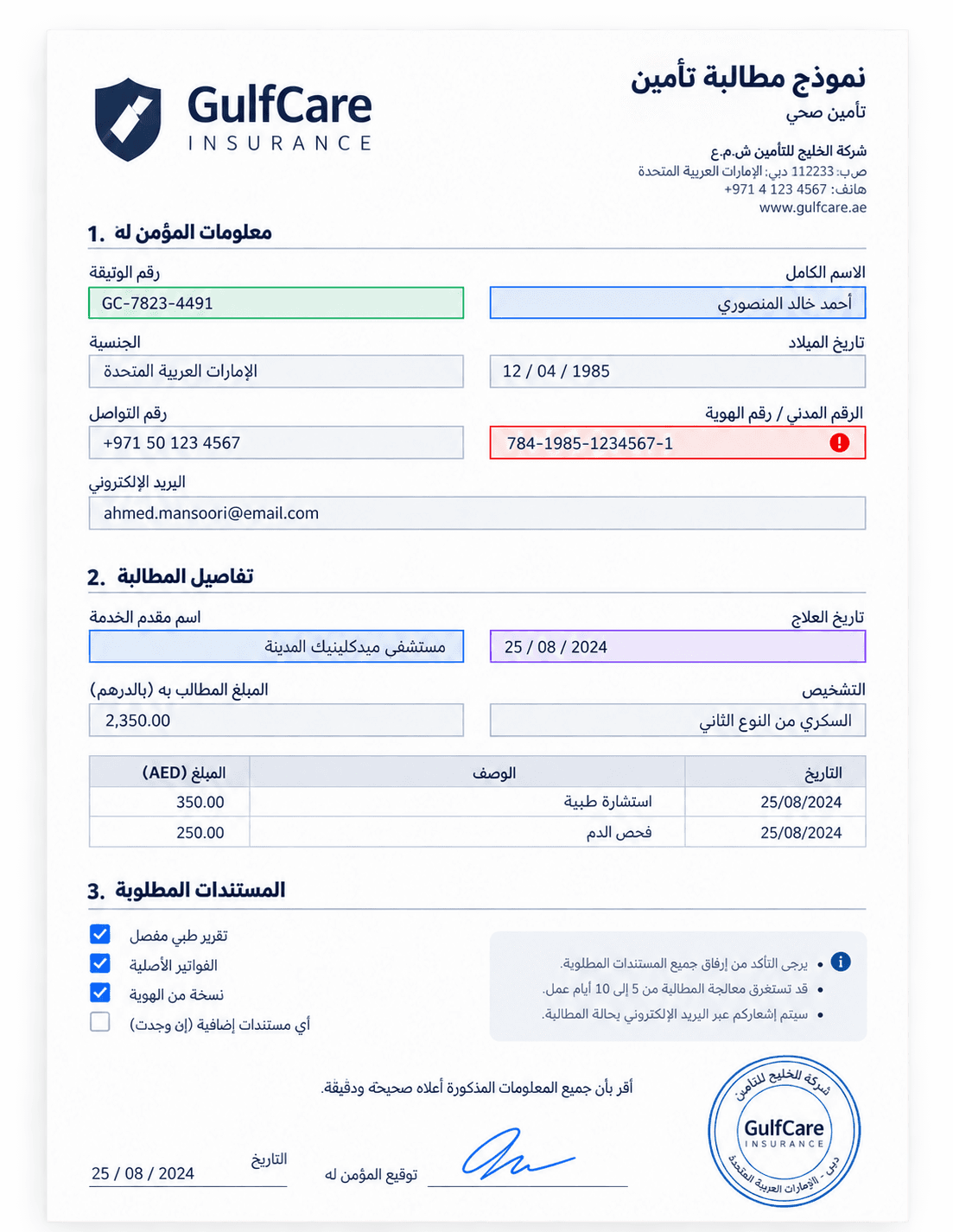
An Arabic insurance claim form with extracted field values traced back to their bounding boxes and confidence scores
99.0%
Field-level accuracy
aggregate, weighted by field count
96,300
Fields adjudicated
double-keyed human ground truth
3,140
Documents in the set
11,480 pages, six categories
2.3%
Fields routed to review
at the default confidence threshold

Measured on the published DocxIntel benchmark set with a fixed extraction schema per document category, scored as exact match on normalised values against human-adjudicated ground truth. Aggregate accuracy is weighted by field count, so it is not the arithmetic mean of the per-category figures below.

Metric definition

What 99% field-level accuracy means — and what it does not

Most published accuracy numbers are unfalsifiable because the metric is never defined. Here is ours, in enough detail that you could argue with it.

Unit

Field-level, not character-level

The unit of measurement is an extracted field value — a policy number, an invoice total, a patient date of birth — scored as a whole. One wrong character fails the whole field. Character-level accuracy would produce a flattering number and tell you nothing about how much rework lands on your team.

Scoring

Exact match after normalisation

A field is correct only if the normalised value is identical to ground truth. Normalisation handles case, whitespace, date formats, separators and Arabic-Indic numerals. There is no fuzzy matching, no edit-distance tolerance and no partial credit for getting most of an address right.

Reference

Human-adjudicated ground truth

Ground truth was keyed independently by two annotators per document and every disagreement was adjudicated by a third reviewer against the original page. No model output was used to seed, suggest or verify ground truth at any stage.

Denominator

Every field is in the denominator

All 96,300 field instances count, including fields the model left empty and pages a human found hard to read. Nothing was excluded as out of scope, illegible or unsupported. Silent exclusion is how accuracy numbers get inflated, so there are no exclusions.

Protocol

Scored once, not tuned against

The benchmark set is held separately from the data used to develop and tune the shipped models, and results are reported from a single scoring run per release rather than the best of several attempts.

Caveat

A measurement, not a guarantee

This is what DocxIntel achieved on this set. It is not a warranty for your documents. The only accuracy figure that binds us commercially is the threshold agreed in writing against your own document set in a Proof of Value.

The set

The benchmark document mix, category by category

The set was built to over-represent the inputs that break extraction tools, not the clean native PDFs that make demos look good. Native digital documents are less than a quarter of it.

Difficult inputs — 1,470 documents

Arabic handwritten forms
620 documents, 1,240 pages. Handwritten claim forms, admission sheets and application forms in Arabic script, including mixed Arabic-Indic and Western numerals and free-text notes in the margins.
Phone-camera photographs
540 documents, 1,090 pages. Handheld photographs of receipts, invoices and forms with perspective distortion, glare, shadow, partial occlusion and fingers in frame.
Multi-generation fax copies
310 documents, 890 pages. Documents that have been faxed, printed, scanned and faxed again, with speckle noise, banding, dropped strokes and skew.

Obstructed and bilingual inputs — 905 documents

Stamped and signed invoices
480 documents, 1,320 pages. Wet-ink stamps and signatures overlapping printed totals, tax numbers and dates, including circular seals across table cells.
Bilingual Arabic-English tables
425 documents, 2,610 pages. Right-to-left and left-to-right content on the same page, bilingual column headers, merged cells and tables continuing across page breaks.

Native digital inputs — 765 documents

Native PDFs and office documents
765 documents, 4,330 pages. Digitally generated statements, policy schedules, contracts and reports with an embedded text layer, included as the control category.
Extraction schemas
18 schemas across insurance, banking, healthcare and commercial document types, between 12 and 64 fields each, fixed before scoring began.
Totals
3,140 documents, 11,480 pages, 96,300 adjudicated field instances. Roughly 42% of pages carry Arabic script, and 765 of 3,140 documents (24%) are native digital — the other 76% arrive as scans, photographs or faxes.

Documents were sourced from anonymised and synthetically generated sets representative of UAE and GCC insurance, banking and healthcare paperwork. No customer document is used in the published benchmark.

Methodology

How the ground truth was established

The credibility of any accuracy number lives entirely in how the reference values were produced. This is the process, including the parts that were expensive.

  1. 1
    Step 1

    Schemas frozen before any scoring

    Each document category was assigned a fixed extraction schema with an explicit definition for every field, including how to handle absent values, multiple candidates on one page and continuation fields. Schemas were frozen before a single document was scored, so no field definition could be adjusted to suit a result.

  2. 2
    Step 2

    Double-blind keying by two annotators

    Every document was keyed independently by two annotators working from the original page image with no access to model output and no access to each other. Bilingual documents were keyed by annotators fluent in both Arabic and English.

  3. 3
    Step 3

    Disagreements adjudicated by a third reviewer

    Where the two keyed values differed, a senior reviewer adjudicated against the source page and recorded the reason. Disagreement ran at roughly 4% of fields overall, concentrated in handwritten Arabic and fax categories — a useful signal in itself, because it marks the fields humans also find hard.

  4. 4
    Step 4

    Genuinely illegible fields marked, not deleted

    Where all three humans agreed a value could not be read from the page, the field was marked illegible and kept in the set with a null ground-truth value. The model is then scored on whether it also declines to populate it — inventing a plausible value for an unreadable field is a failure, not a near miss.

  5. 5
    Step 5

    Automated scoring with published normalisation

    Scoring is a deterministic script: normalise both values with the documented rules, compare for exact equality, aggregate by category and by field. The same script runs during a Proof of Value against your adjudicated set, so the two numbers are directly comparable.

Results

Per-category accuracy, including the categories we lose ground on

Reporting a single blended number would hide the only thing an evaluator needs: which of your document types will land in a review queue. The residual error column names the failure mode that dominates each category.

Per-category accuracy, including the categories we lose ground on
CriterionField-level accuracyFields routed to reviewDominant residual error
Native PDFs and office documents99.9%0.4%Ambiguous duplicate fieldstwo totals on one page
Bilingual Arabic-English tables99.5%1.1%Cell association across RTL headers
Stamped and signed invoices99.4%1.6%Digits fully occluded by seal ink
Phone-camera photographs99.1%2.4%Glare and blur on small print
Arabic handwritten forms98.1%5.2%Connected handwriting, similar glyphshuman annotators disagreed here too
Multi-generation fax copies97.2%7.8%Dropped strokes and speckle
Aggregate, weighted by field count99.0%2.3%Handwriting and degraded scans

Native PDFs and office documents

Field-level accuracy
99.9%
Fields routed to review
0.4%
Dominant residual error
Ambiguous duplicate fieldstwo totals on one page

Bilingual Arabic-English tables

Field-level accuracy
99.5%
Fields routed to review
1.1%
Dominant residual error
Cell association across RTL headers

Stamped and signed invoices

Field-level accuracy
99.4%
Fields routed to review
1.6%
Dominant residual error
Digits fully occluded by seal ink

Phone-camera photographs

Field-level accuracy
99.1%
Fields routed to review
2.4%
Dominant residual error
Glare and blur on small print

Arabic handwritten forms

Field-level accuracy
98.1%
Fields routed to review
5.2%
Dominant residual error
Connected handwriting, similar glyphshuman annotators disagreed here too

Multi-generation fax copies

Field-level accuracy
97.2%
Fields routed to review
7.8%
Dominant residual error
Dropped strokes and speckle

Aggregate, weighted by field count

Field-level accuracy
99.0%
Fields routed to review
2.3%
Dominant residual error
Handwriting and degraded scans

Scored on the benchmark set described above, as exact match on normalised values against human-adjudicated ground truth, with every schema field in the denominator. The aggregate is weighted by field count rather than by document count, which is why it sits above the mean of the column. Fields routed to review are those below the default confidence threshold; they are counted as errors in the accuracy column if the value was wrong, whether or not they were flagged.


Where it breaks

The categories where accuracy falls, and why we publish them.

A vendor that cannot tell you where its product degrades has either not measured it or would prefer you found out after signing. Handwritten Arabic at 98.1% and multi-generation faxes at 97.2% are the honest edges of this benchmark, and both behave predictably rather than catastrophically.

  • Connected Arabic handwriting with similar glyph shapes is the single largest residual error source — the same fields where two human annotators disagreed roughly 9% of the time
  • Fax generations compound: a third-generation copy loses strokes that no amount of preprocessing restores, so the model declines the field rather than inventing a value
  • Seal ink that fully occludes a digit is unrecoverable by design; the field is flagged with its bounding box so a reviewer can check the original in seconds
  • Photographs fail on small print under glare, not on layout — deskew, dewarp and glare suppression handle the geometry, but a blown-out region carries no information
  • Degradation is graceful: errors concentrate in low-confidence fields, so raising the threshold moves them into the review queue instead of into your database

This is the useful test of any accuracy claim. Ask a vendor for their worst category and the failure mode that dominates it. If they will not answer, the headline number is not measured the way yours would be.

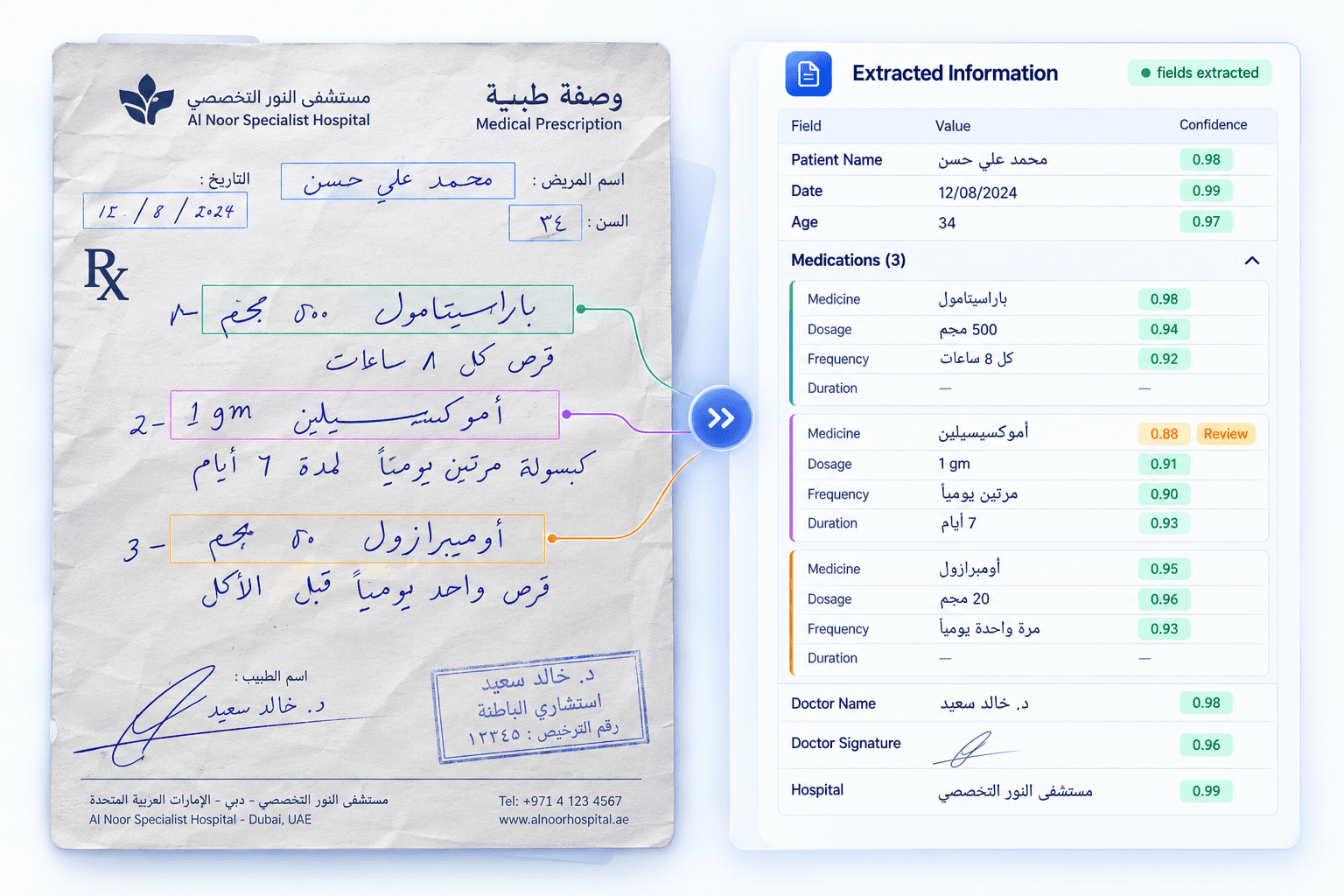
A handwritten prescription with low-confidence fields flagged for human review and their source regions highlighted
Confidence calibration

How a confidence score becomes a review queue

An accuracy figure only becomes an operating model when confidence is calibrated — that is, when a score of 0.9 really does mean roughly nine out of ten right. Calibration is what lets you size a review team instead of guessing.

Property

Scores are calibrated, not vibes

Confidence is calibrated against observed correctness on the benchmark set, so the predicted probability tracks the measured hit rate within a few points across each band. An uncalibrated score cannot be used to set a threshold, however precise it looks.

Control

You set the threshold, per field

Thresholds are configured per field, not per document, because an IBAN and a free-text remark do not deserve the same scrutiny. Financial identifiers can sit at a strict threshold while descriptive fields pass through at a looser one.

Trade-off

The dial you are actually turning

At the default threshold, 2.3% of benchmark fields route to review and the fields passing straight through score 99.7%. Tightening the threshold raises straight-through accuracy and grows the queue; loosening it does the reverse. The trade-off is explicit and yours to set.

Workflow

Review is a queue, not a re-key

A flagged field arrives with the page, the bounding box and the original image region highlighted, so a reviewer confirms or corrects one value rather than reading the whole document. This is why review cost tracks flagged fields, not flagged documents.

Audit

Every value keeps its provenance

Page number, bounding-box coordinates and confidence travel with each field into your systems, so an internal auditor or a regulator can trace a posted figure back to the pixels it came from months later.

See field traceability →
Operations

Re-measurable after every upgrade

Because reprocessing is unmetered, you can re-score your own adjudicated set against a new model bundle before promoting it. Accuracy regression testing on your real documents becomes routine rather than a budget decision.

Verification

How to reproduce this benchmark on your own documents

The published number is evidence of method. The number that should decide your purchase is the one measured on your paperwork, in your environment, and written into a contract.

  1. 1
    Step 1

    Assemble a representative set, hard documents included

    Between 300 and 1,000 documents spanning your real categories, deliberately including the scans, photographs and handwritten forms your current process struggles with. A set of clean native PDFs will produce a flattering number that tells you nothing.

  2. 2
    Step 2

    Agree the schema and the scoring rules in writing

    Fields, field definitions, normalisation rules and the treatment of absent and illegible values are fixed before anything runs — using the same rules published on this page. Both sides sign the definition of correct before either side sees a result.

  3. 3
    Step 3

    Your reviewer owns the ground truth

    Your named reviewer adjudicates the reference values, because ground truth on your documents is a domain judgement, not a vendor one. We supply the tooling and the adjudication workflow; you decide what the right answer is.

  4. 4
    Step 4

    Score inside your environment

    DocxIntel runs on your hardware behind your firewall, the same deterministic scoring script runs against your adjudicated set, and results come back per category and per field — including which fields would have been routed to review at each threshold.

  5. 5
    Step 5

    Turn the number into a contracted threshold

    The Proof of Value states the accuracy threshold on your set before the work begins. Meet it and the licence converts at the price already agreed; miss it and you keep the measured report and owe nothing further. That is the only accuracy promise we are willing to make.

Questions evaluators ask about the accuracy benchmark

If a question you need answered is missing, ask an engineer directly rather than a sales team.

No, and the difference matters enormously. Character-level OCR accuracy of 99% means roughly one wrong character in every hundred, which on a fifteen-character IBAN is a broken IBAN most of the time. Field-level accuracy of 99% means 99 of every 100 extracted field values match the human-adjudicated ground truth exactly after normalisation. It is the harder metric, and it is the one that maps to how many records a human has to fix.

Exact match on the normalised value, scored automatically against the adjudicated ground truth. Normalisation covers whitespace, letter case, date format, thousands separators, currency symbol placement and Arabic-Indic to Western numeral conversion — so 15/03/2026 and 2026-03-15 are the same date, and ٢٠٢٦ is the same year as 2026. Nothing else is forgiven. A transposed digit, a dropped line of an address or the wrong one of two totals on a page all score as wrong, with no partial credit.

Every field in the extraction schema for every document in the set, including fields the model declined to populate and documents a human found difficult. Nothing is dropped for being illegible, out of scope or low quality, because excluding hard pages is the single easiest way to manufacture a high accuracy number. A field the model left empty when ground truth has a value counts as an error, not as an abstention.

It should not be assumed, and we will not claim it. Our benchmark set is deliberately hostile, but it is not your document mix, your scanner fleet, your handwriting or your schema. This is exactly why the Proof of Value measures accuracy on your documents and why the threshold we contract to is set against your set, not ours. Treat the published figure as evidence that the methodology is sound, and the Proof of Value number as the one that governs the decision.

They are routed, not guessed. Every field carries a calibrated confidence score alongside its page number and bounding box, and fields below your configured threshold go to a review queue with the source region highlighted. At the default threshold, 2.3% of fields on the benchmark set are routed for review and the accuracy of the fields that pass straight through rises to 99.7%. Moving the threshold trades review volume against straight-through accuracy, and you own that dial.

Yes, and that is the point of publishing the methodology. During a Proof of Value we deploy inside your environment, you supply a representative document set, your named reviewer adjudicates the ground truth, and scoring runs with the same normalisation rules and the same all-fields denominator described on this page. The result is a per-category report on your own documents, which you keep regardless of whether you go on to license the platform.

Keep reading

Proof of Value→How the accuracy threshold on your own documents is measured and contracted.Analyse→The layout, OCR and table-structure layer every accuracy number depends on.Identify→Field extraction with page numbers, bounding boxes and confidence on every value.Sizing and throughput→What the benchmark document mix implies for GPU workers and pages per hour.Pricing→Why unmetered reprocessing makes accuracy regression testing routine.Compare alternatives→How marketed accuracy ranges from other platforms should be read.

Measure it on your own documents.

A paid Proof of Value scores DocxIntel against ground truth your reviewer adjudicates, inside your environment, with the threshold and the conversion price fixed in writing beforehand.

Talk to an engineer
How the Proof of Value works
  • Threshold agreed up front
  • Runs in your environment
  • You keep the report either way
DocxIntel Logo

A product of BizfyLabs

Document intelligence that never leaves your building. Analyse, identify, classify, map, modify and ask — inside your own infrastructure.

BizfyLabs on LinkedInDocxIntel documentationBizfyLabs

Product

  • Capabilities
    • Analyse
    • Identify
    • Classify
    • Map
    • Modify
    • Ask
  • Accuracy benchmark
  • Pricing
  • Proof of Value

Technical

  • Deployment models
  • Reference architectures
  • Sizing & throughput
  • What's in the box
  • Security posture
  • Model licences
  • Documentation
  • API reference

Solutions

  • All industries
  • Insurance & TPAs
  • Healthcare
  • Banking & finance
  • Government
  • Legal
  • Energy & logistics

Compare

  • Compare approaches
  • LlamaParse alternative
  • Docsumo alternative
  • On-premise document AI

Company

  • About DocxIntel
  • FAQ
  • Partners
  • BizfyLabs
  • Careers
  • Contact

© 2026 BizfyLabs FZC LLC. All rights reserved.

DocxIntel™ is a product of BizfyLabs FZC LLC.

  • Privacy Policy·
  • Terms of Service·
  • Data Processing Addendum·
  • Acceptable Use·
  • Model Licences·
  • Security·
  • Cookies

Registered in the United Arab Emirates. Delivery partner: Bizfy Solutions LLP, Indore, India.

DocxIntel